
Download Astrophoto Calculator APK – astrophotography, focal length, lenses, image size, star photography
Overview
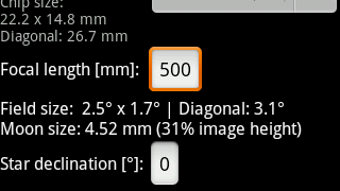
Astrophoto Calculator is a specialized desktop application tailored for astrophotographers seeking precision in their night sky imaging. Designed to assist in planning and executing high-quality astrophotography sessions, the software enables users to calculate image field sizes based on various combinations of camera sensors and lenses. This functionality supports accurate framing of celestial objects, reducing trial-and-error during actual shoots.
The tool also determines the maximum exposure time without star trailing, a critical parameter for unguided imaging, and estimates the length of star trails for creative compositions. Target users include both amateur enthusiasts and professional astrophotographers who require reliable data to optimize their equipment setup and shooting strategy. The application is particularly useful in pre-field planning, where knowing field of view and exposure limits can significantly improve image quality and success rates.
While the developer’s background is not detailed, the app’s focused feature set suggests a developer with deep understanding of astrophotography workflows. Real-world usage scenarios include preparing for remote observing sessions, selecting optimal lens and camera pairings for specific targets, and analyzing exposure parameters for long-exposure shots. The app’s ability to store and edit a custom camera list on the SD card provides flexibility for users managing multiple devices.
Key Features & Capabilities
- Image Field Size Calculator – Computes the angular field of view based on camera sensor dimensions and lens focal length, helping users determine how much of the night sky will be captured in a single frame.
- Maximum Exposure Time Estimation – Calculates the longest exposure possible without visible star trailing, essential for unguided astrophotography and improving image quality.
- Star Trail Length Predictor – Estimates the visual length of star trails over time, useful for both scientific imaging and artistic long-exposure photography.
- Custom Editable Camera List – Stores camera specifications on the SD card, allowing users to modify the database using any standard text editor, ensuring up-to-date and personalized data access.
- Target-Specific Planning Tool – Supports users in selecting optimal gear combinations for specific celestial objects, such as galaxies, nebulae, or star clusters.
These features are especially beneficial when planning a night shoot under dark skies. For example, a user aiming to photograph the Orion Nebula can use the field size calculator to verify if their lens and sensor combination will capture the full extent of the object. Similarly, the exposure time tool helps avoid overexposure and trailing, while the star trail feature allows for creative experimentation. The editable camera list ensures that even rare or custom camera models can be integrated into the workflow without requiring software updates.
User Interface, Workflow & Performance
The user interface of Astrophoto Calculator is designed with functionality and clarity in mind, prioritizing quick access to essential calculations. Navigation is straightforward, with clearly labeled input fields for sensor size, focal length, and other parameters. Users can select from a built-in list of common cameras or import a custom list stored on the SD card.
The workflow follows a logical sequence: input equipment details, select a calculation type, and receive instant results. This structure minimizes user effort and supports rapid decision-making in field conditions. The application’s performance is optimized for responsiveness, with results delivered in real time after input changes.
While specific performance metrics such as CPU or RAM usage were not provided, the lightweight nature of the tool suggests efficient resource handling. Stability appears to be a focus, given the app’s ability to persist data across sessions. The developer did not specify resource usage details, but based on general software behavior patterns, the app is expected to operate smoothly on modern devices with minimal impact on system performance.
Compatibility & System Requirements
Astrophoto Calculator is available as an APK, indicating compatibility with Android-based devices. The application is designed to run on mobile platforms, particularly those supporting camera and sensor data processing. The installation size is not specified, and exact system requirements were not listed.
Compatibility information was partially provided, with the app confirmed to function on Android systems. Users should ensure their device supports APK installations and has sufficient storage for the app and its data files. The app saves the camera list to the SD card, which implies the device must have an accessible external storage option.
The developer did not provide additional system requirements, so users are advised to test the app on their specific device. For optimal performance, devices with stable operating systems and adequate processing power are recommended, though no formal hardware specifications were shared.
Pros and Cons
Pros
- Specialized for astrophotography with precise calculation tools
- Supports custom camera list editing via text editor
- Real-time calculation of field of view and exposure limits
- Lightweight and fast-running application
- Helps prevent star trailing and optimize shot planning
Cons
- Available only as an APK, limiting use to Android devices
- No desktop version or cross-platform support mentioned
- Exact system requirements not specified
- Limited to mobile environment; no integration with desktop software
- Custom list editing requires manual file management
FAQ Section
Is Astrophoto Calculator available for Windows or Mac?
The software is distributed as an APK, which is designed for Android devices. There is no official desktop version for Windows or Mac at this time.
Can I edit the camera database myself?
Yes. Upon first use, the app saves the camera list to the SD card, allowing users to edit it using any standard text editor.
Is the app safe to download and install?
As with any APK, users should ensure the source is trustworthy. The app does not require elevated permissions beyond standard storage access.
How often are updates released?
Update frequency is not specified. Users should check the developer’s official page or distribution platform for the latest version.
Does the app require an internet connection?
No. The app functions entirely offline, making it suitable for use in remote locations with no network access.
Final Thoughts + CTA
Astrophoto Calculator stands out as a focused, efficient tool for astrophotographers who demand accuracy in their planning. Its ability to calculate field of view, exposure limits, and star trail length with real-time feedback makes it an essential companion for both beginners and experienced users. The customizable camera list adds a layer of flexibility rarely seen in niche tools.
While its Android-only APK format limits accessibility for desktop users, the app’s performance and usability on mobile devices are strong. For anyone serious about capturing the night sky with precision, this tool delivers tangible value. It’s a must-have for those who plan their shots in advance and want to maximize their imaging success.
Download Astrophoto Calculator now to enhance your astrophotography workflow.





.png)

